# Data tables
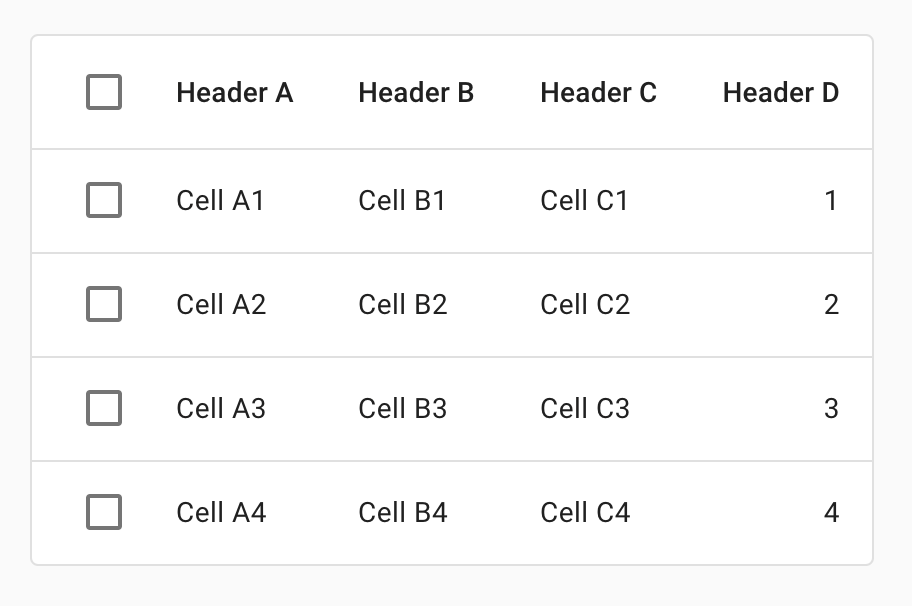
[Data tables](https://material.io/components/data-tables/#) display sets of data across rows and columns.
## Using data tables
Data tables display information in a grid-like format of rows and columns. They organize information in a way that’s easy to scan, so that users can look for patterns and insights.
Data tables can contain:
* Interactive components (such as chips, buttons, or menus)
* Non-interactive elements (such as badges)
* Tools to query and manipulate data
### Installation
```
npm install @material/data-table
```
### Styles
```scss
@use "@material/checkbox"; // Required only for data table with row selection.
@use "@material/icon-button"; // Required only for data table with column sorting.
@use "@material/data-table/data-table";
@include checkbox.core-styles;
@include icon-button.core-styles;
@include data-table.core-styles;
@include data-table.theme-baseline;
```
**Note: Styles for any components you intend to include within data-table (e.g. Checkboxes, Buttons etc.) must be
loaded.**
### JavaScript instantiation
```js
import {MDCDataTable} from '@material/data-table';
const dataTable = new MDCDataTable(document.querySelector('.mdc-data-table'));
```
> See [Importing the JS component](../../docs/importing-js.md) for more information on how to import JavaScript.
> Instantiating `MDCDataTable` component is only required to add interactions for example, row selection.
MDC Data Table component auto instantiates `MDCCheckbox` for header row checkbox and all row checkboxes. Make sure to set required class names to instantiate checkbox component. We suggest to use `layout` API when rows are added or removed from data table to register new checkbox components.
### Making data tables accessible
Please refer to the [WAI-ARIA Authoring Practices for table](https://www.w3.org/TR/wai-aria-practices-1.1/#table) for the ARIA recommended role, states and properties required for table element.
## Data tables
Data table currently supports following features.
### Standard data table
Use this to render data table without any interactivity such as row selection, sorting, etc.
```html
| Frozen yogurt |
24 |
4.0 |
Super tasty |
| Ice cream sandwich |
37 |
4.33333333333 |
I like ice cream more |
| Eclair |
24 |
6.0 |
New filing flavor |
```
### Data table with row selection
The row selection feature allows users to select table rows via row checkboxes. Users can select or unselect all rows using the header row checkbox. Additionally, the header row checkbox will be automatically updated based on the checked status of each row's checkbox, whether it was checked manually or programmatically.
#### HTML Structure
```html
|
|
Arcus watch slowdown |
Online |
Medium |
Triaged |
0:33 |
Allison Brie |
|
|
monarch: prod shared ares-managed-features-provider-heavy |
Offline |
Huge |
Triaged |
0:33 |
Brie Larson |
|
|
monarch: prod shared ares-managed-features-provider-heavy |
Online |
Minor |
Not triaged |
0:33 |
Jeremy Lake |
|
|
Arcus watch slowdown |
Online |
Negligible |
Triaged |
0:33 |
Angelina Cheng |
```
#### JavaScript APIs
- Use `layout()` API when new row checkboxes are added or removed from data table.
- Programmatically get / set row selection using following API's:
- `getSelectedRowIds()`
- `setSelectedRowIds(string[])`
### Data table with pagination
Pagination is rendered at the footer section of data table. Pagination helps
user change the rows per page (page size) and navigate between data table pages.
#### HTML Structure
```html
| Frozen yogurt |
24 |
4.0 |
Super tasty |
| Ice cream sandwich |
37 |
4.33333333333 |
I like ice cream more |
| Eclair |
24 |
6.0 |
New filing flavor |
```
#### JavaScript APIs
Data table component does not provide any JavaScript APIs for pagination.
- Should manually initialize following components supporting pagination feature:
- Select component: Used to change rows per page (page size).
- Icon button: Used to navigate between data table pages.
- Should re-render data table content when rows per page is changed or navigated to another page using events triggered by select & pagination button.
- Should manually enable or disable pagination buttons accordingly when data table reaches first or last page.
### Data table with progress indicator
Progress indicator inform users about the status of ongoing processes, such as data loading. Indeterminate linear progress indicator along with a scrim is shown on blocking the table content.
#### HTML Structure
```html
| Frozen yogurt |
24 |
4.0 |
Super tasty |
| Ice cream sandwich |
37 |
4.33333333333 |
I like ice cream more |
| Eclair |
24 |
6.0 |
New filing flavor |
```
#### JavaScript APIs
- Use `showProgress()` and `hideProgress()` API to show or hide the progress indicator.
- Data table component will automatically initializes the linear progress indicator subcomponent.
#### Events
Following events are emitted for row selection feature.
Event constant | Event name | Event detail | Description
-- | -- | -- | --
`ROW_SELECTION_CHANGED` | `MDCDataTable:rowSelectionChanged` | `MDCDataTableRowSelectionChangedEventDetail` | Event emitted when row checkbox is checked or unchecked.
`SELECTED_ALL` | `MDCDataTable:selectedAll` | `void` | Event emitted when header row checkbox is checked.
`UNSELECTED_ALL` | `MDCDataTable:unselectedAll` | `void` | Event emitted when header row checkbox is unchecked.
### Data table with column sorting
The column sorting feature allows users to reorder table rows in ascending or descending order by a column.
The data table handles sorting as follows:
- Triggers event when sort icon button is clicked.
- Flips the sort icon based on sort direction.
- Sets appropriate ARIA attributes based on sort status.
Data table consumer should re-render the table body (rows) in sorted order on `events.SORTED` event.
#### HTML Structure
Set `data-column-id` on sortable header cell element to uniquely identify column
that needs to be sorted.
```html
| Frozen yogurt |
24
|
4.0
|
Super tasty |
```
#### Events
Event constant | Event name | Event detail | Description
-- | -- | -- | --
`SORTED` | `MDCDataTable:sorted` | `SortActionEventDetail` | Event emitted when clicked on sortable header cell.
## Style customization
### CSS classes
CSS Class | Description
--- | ---
`mdc-data-table` | Mandatory. The root DOM element containing `table` and other supporting elements.
`mdc-data-table--sticky-header` | Optional. Modifier class name added to root element to make header row sticky (fixed) on vertical scroll. (Note: Sticky header feature is not compatible with IE11 browsers.)
`mdc-data-table__table-container` | Mandatory. Container of Table element. Used for horizontal overflowing of table content.
`mdc-data-table__table` | Mandatory. Table element. Added to `table` HTML tag.
`mdc-data-table__header-row` | Mandatory. Table header row element. Added to `thead > tr` HTML tag.
`mdc-data-table__header-cell` | Mandatory. Table header cell element. Added to `thead > tr > th` HTML tag.
`mdc-data-table__header-cell--checkbox` | Optional. Table header cell element that contains `mdc-checkbox`. Added to `thead > tr > th` HTML tag.
`mdc-data-table__header-cell--numeric` | Optional. Table header cell element that maps to numeric cells. Added to `thead > tr > th` HTML tag.
`mdc-data-table__content` | Mandatory. Table body element. Added to `tbody` HTML tag.
`mdc-data-table__row` | Mandatory. Table row element. Added to `tbody > tr` HTML tag.
`mdc-data-table__cell` | Mandatory. Table cell element. Added to `tbody > tr > td` HTML tag.
`mdc-data-table__cell--numeric` | Optional. Table cell element that contains numeric data. Added to `tbody > tr > td` HTML tag.
`mdc-data-table__cell--checkbox` | Optional. Table cell element that contains `mdc-checkbox`. Added to `thead> th > td:first-child` HTML tag.
`mdc-data-table__header-row-checkbox` | Optional. Checkbox element rendered inside table header row element. Add this class name to `mdc-checkbox` element to override styles required for data-table.
`mdc-data-table__row-checkbox` | Optional. Checkbox element rendered inside table row element. Add this class name to `mdc-checkbox` element to override styles required for data-table.
`mdc-data-table__row--selected` | Optional. Modifier class added to `mdc-data-table__row` when table row is selected.
`mdc-data-table__header-cell--sorted` | Optional. Modifier class added to header cell element if column is sorted.
`mdc-data-table__header-cell--sorted-descending` | Optional. Modifier class added to header cell element if column is sorted in descending order.
`mdc-data-table__header-cell--with-sort` | Optional. Modifier class added to header cell element if column supports sorting.
`mdc-data-table__header-cell-wrapper` | Mandatory. Container of header cell label and sort button, used to align header cell in center.
`mdc-data-table__sort-icon-button` | Optional. Class name added to icon button used as sort icon button. This is sibling to header cell label.
`mdc-data-table__header-cell-label` | Mandatory. Class name added to header cell label. Child to header cell wrapper element.
`mdc-data-table__sort-status-label` | Optional. Class name added to sort status label which is visually hidden. Only visible to screen reader users.
`mdc-data-table__pagination` | Root element of pagination. Pagination block element is rendered as immediate child to data table root element.
`mdc-data-table__pagination-trailing` | Immediate child of pagination. Used to wrap pagination content.
`mdc-data-table__pagination-rows-per-page` | Container of rows per page label and rows per page select.
`mdc-data-table__pagination-rows-per-page-select` | Class name added to select component used for changing rows per page (page size).
`mdc-data-table__pagination-rows-per-page-select--outlined` | Class name added to outlined select component used for changing rows per page (page size). Used to override outlined select styles.
`mdc-data-table__pagination-navigation` | Block element containing all icon buttons used to navigate between data table pages.
`mdc-data-table__pagination-button` | Class name added to icon button component used to navigate between data table pages.
`mdc-data-table__progress-indicator` | Block element rendered as immediate child to data table root element. Contains linear progress and scrim blocking the data table content.
`mdc-data-table__scrim` | Element blocking data table content. Rendered inside progress indicator root element.
`mdc-data-table__linear-progress` | Class name added to linear progress component. Rendered inside progress indicator root element.
### Sass mixins
See [_mixins.scss](./_mixins.scss) file for up-to-date code documentation of Data table theme APIs.
## `MDCDataTable` properties and methods
See [component.ts](./component.ts) file for up-to-date code documentation of Data table component APIs.
## Usage within web frameworks
If you are using a JavaScript framework, such as React or Angular, you can create a Data Table for your framework. Depending on your needs, you can use the _Simple Approach: Wrapping MDC Web Vanilla Components_, or the _Advanced Approach: Using Foundations and Adapters_. Please follow the instructions [here](../../docs/integrating-into-frameworks.md).
See [MDCDataTableAdapter](./adapter.ts) and [MDCDataTableFoundation](./foundation.ts) for up-to-date code documentation of Data table foundation APIs.